
Use: The equipment setup is used for real-time rover with extended periods of use in the field.
Description: Connections are made to the GNSS antenna, radio antenna and field controller.
The field controller is fixed to the pole with the GHT63. Connection between the iCON gps 70 instrument and the field controller is made through Bluetooth.
• The antenna is mounted directly using screw fitting. If using stub and adapter, procedures can vary slightly.
• When using the pole with stub, ensure that the antenna and the screwto-stub adapter slide down the full length of the stub before tightening the locking ring. An incorrectly mounted antenna will have a direct effect on the results.
• Carbon fibre poles are used since they are recommended for automatic tilt compensated measurements. For applications without tilt compensation, they can be replaced with their aluminium equivalent without any changes to these instructions.
• Standard radio is used throughout the instructions. Digital cellular phones can also be used but the setup can differ slightly.
Real-time rover setup with iCON CC70/CC80
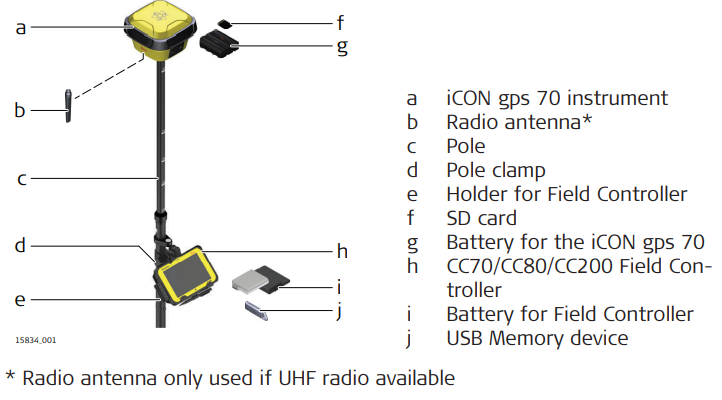
➜ Cellular modem available on the CC70/CC80 Field controller.
Real-time rover setup step-by-step
Setting Up the Equipment
- Insert the battery into the iCON gps 70 SmartAntenna.
- Screw iCON gps 70 SmartAntenna onto the top of the telescopic pole.
- Ensure that the compression lock is not clamped.
- Extend the telescopic pole and ensure that the snap-lock clicks into its position. The snap-lock ensures that there is no slipping of the telescopic pole.
- Clamp the compression lock. The compression lock maintains straightness.
- Fix the holder to the clamp with the tightening screw. Before tightening, ensure that the holder is at a comfortable working height and angle. This can be achieved by sliding the clamp along the pole and rotating the holder about the clamp. Tighten the tightening screw.
- Insert the battery into the field controller.
- Clip the field controller onto the holder and lock into position.
- Turn on the antenna and the controller.
- Run the data collection or stake-out application of the iCONstruct Field software
➜ Refer to the iCONstruct Field software manual for further information.