
Real-time reference setup with internal modem
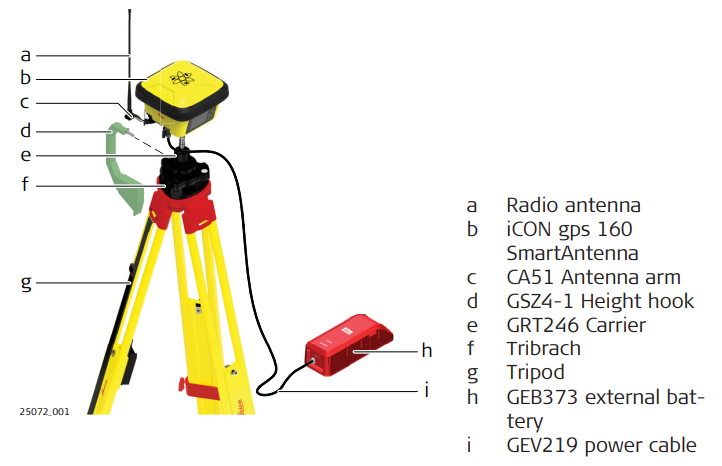
Real-time reference setup step-by-step
1. Setting Up the Equipment
• Set up the tripod, mount and level the tribrach onto the tripod.
• Check that the tribrach is correctly centred over the marker.
• Place and lock the carrier into the tribrach.
• Screw the iCON gps 160 SmartAntenna onto the carrier.
• Check that the tribrach is still correctly positioned and levelled.
• Hang the external battery onto a tripod leg.
• Take the GEV219.
• Attach the 8 pin plug connector to the iCON gps 160 SmartAntenna.
• Attach the 5 pin plug connector to the external battery.
• Insert the battery into the field controller.
• Turn on the antenna and the Field Controller.
2. Perform a Base Station setup on the iCON gps 160 SmartAntenna or configure a Base Station in the iCON field software
• Refer to 6.1 Base Setup or the iCON site Software Manual for further information.