
Use: The equipment setup described is used for static operations over markers.
Description: The instrument can be programmed with the field controller before use which
can then be omitted from the setup.
• The antenna is mounted directly using screw fitting. If using stub and adapter, procedures can vary slightly.
• When using the adapter and carrier, ensure that the antenna and the adapter assembly slide down the full length of the carrier stub. An incorrectly mounted antenna will have a direct effect on the results.
➜ Use an external battery such as GEB373 to ensure operation for a full day.
Equipment setup
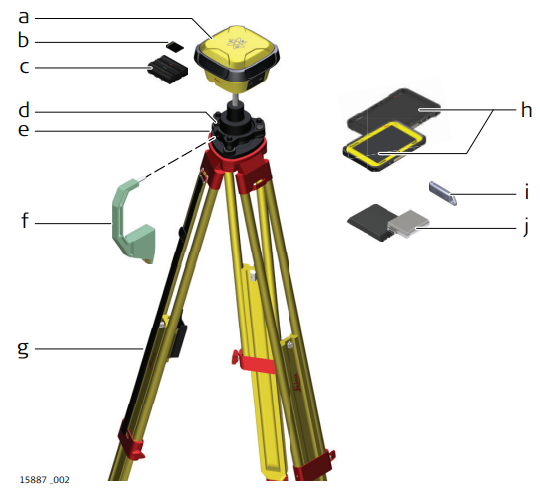
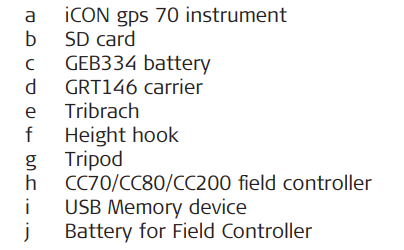
Equipment setup step-by-step
- Set up the tripod.
- Mount and level the tribrach on the tripod.
- Ensure that the tribrach is over the marker.
- Place and lock the carrier in the tribrach.
- Insert the data storage device and the batteries into the iCON gps 70.
- Screw the iCON gps 70 onto the carrier.
- Check that the tribrach is still levelled.
- Insert the data storage device and the battery into the field controller.
- Switch on the field controller and connect it to the instrument if necessary.
- To hang the field controller on the tripod leg, use the hook on the hand strap or use the utility hook. Refer to the User Manual of the field controller.
- Insert the height hook into the carrier.
- Measure the antenna height using the height hook.
- Press the ON/OFF button on the instrument for at least 2 s to switch on the instrument.