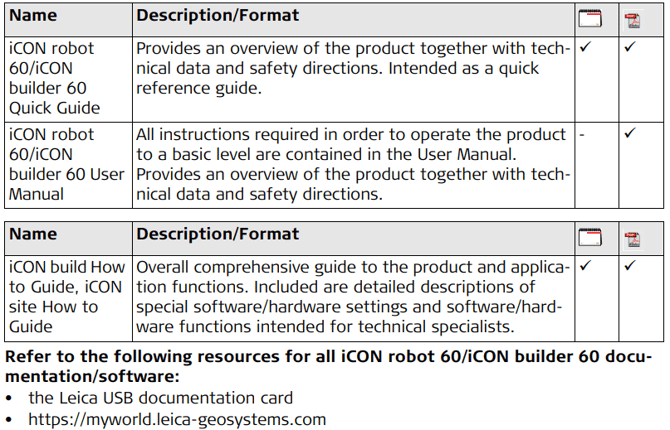
 This manual contains important safety directions as well as instructions for setting up the product and operating it. Refer to "1 Safety Directions" for further information.
Read carefully through the User Manual before you switch on the product.
Product identification
The type and serial number of your product are indicated on the type plate. Always refer to this information when you need to contact your agency or Leica Geosystems authorised service workshop.
Trademarks
• Windows is a registered trademark of Microsoft Corporation in the United States and other countries
• Bluetooth® is a registered trademark of Bluetooth SIG, Inc.
• SD Logo is a trademark of SD-3C, LLC. All other trademarks are the property of their respective owners.
Validity of this manual
This manual applies to the iCON robot 60/iCON builder 60 instruments. Differences between the various models are marked and described.
Available documentation

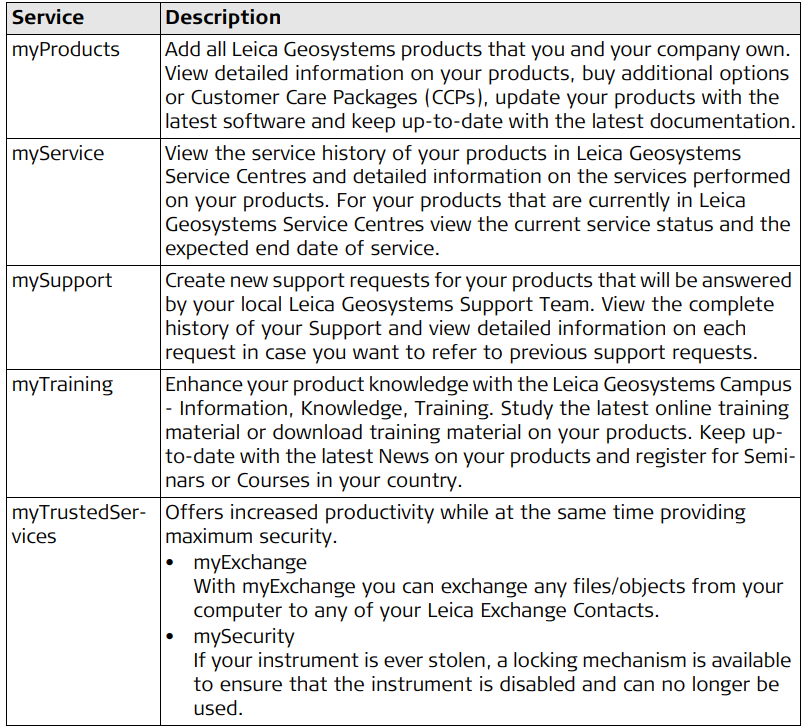
myWorld@Leica Geosystems (https://myworld.leica-geosystems.com) offers a wide range of services, information and training material.With direct access to myWorld, you are able to access all relevant services whenever it is convenient for you, 24 hours a day, 7 days per week. This increases your efficiency and keeps you and your equipment instantly updated with the latest information from
Leica Geosystems.