
Use: The equipment setup is used for real-time rover with extended periods of use in the field.
Real-time rover setup with iCON CC80
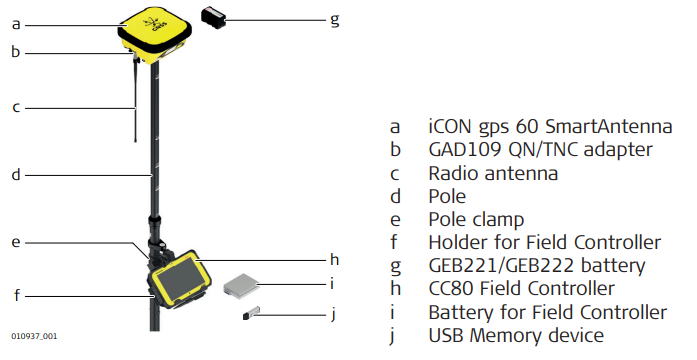
Real-time rover setup step-by-step
1. Setting Up the Equipment
• Insert the battery into the iCON gps 60 SmartAntenna.
• Screw iCON gps 60 SmartAntenna onto the top of the telescopic pole.
• Ensure that the compression lock is not clamped.
• Extend the telescopic pole and ensure that the snap-lock clicks into its position. The snap- lock ensures that there is no slipping of the telescopic pole.
• Clamp the compression lock. The compression lock maintains straightness.
• Fix the holder to the clamp with the tightening screw. Before tightening, ensure that the holder is at a comfortable working height and angle. This can be achieved by sliding the clamp along the pole and rotating the holder about the clamp. Tighten the tightening screw.
• Insert the battery into the field controller.
• Clip the field controller onto the holder and lock into position.
• Turn on the antenna and the controller.
2. Run the data collection or stake-out application of the iCON Site software
• Refer to the iCON site Software Manual for further information.