
Local Base Station setup with external GNSS antenna
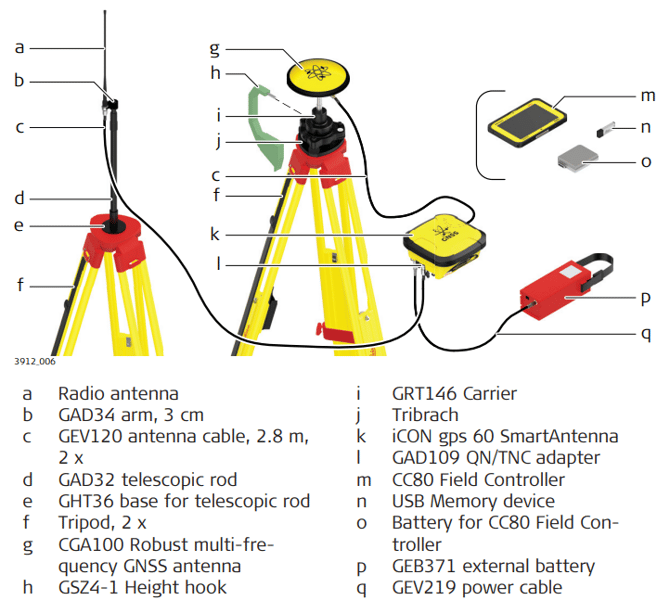
Local Base Station setup with external GNSS antenna step-by-step
1. Setting Up the CGA100 and radio antenna:
• Set up both tripods.
• Mount and level the tribrach onto the tripod for the CGA100.
• Check that the tribrach is correctly centred over the marker.
• Place and lock the carrier into the tribrach.
• Screw the CGA100 antenna onto the carrier.
• Check that the tribrach is still correctly positioned and levelled.
• Mount the GHT36 on the 2nd tripod. Attach the telescopic rod and the GAD34 arm.
• Screw the radio antenna onto the GAD34 arm.
2. Setting Up the iCON gps 60 SmartAntenna:
• Place the iCON gps 60SmartAntenna e.g. in a container.
• Attach the QN/TNC adapter to the QN port.
• Connect the TNC cable to the QN/TNC adapter of the SmartAntenna and the GAD34 at the radio antenna.
• Connect a second TNC cable to the SmartAntenna and the CGA100 antenna.
• Connect the iCON gps 60SmartAntenna via the 8-pin socket to an external power source.
• Use the GEV219 cable to connect the external battery GEB371 using the 5-pin socket. OR
• Use the GEV71 cable to connect i.e. a car battery with the free wire ends.
• Insert the battery into the field controller.
• Turn on the antenna and the controller.
3. Perform a Base Station setup on the iCON gps 60 SmartAntenna or run the Reference Setup application of the iCON site software
• Refer to 6.1 Base Setup respectively the iCON site Software Manual for further information.
☞ Connecting the GEV71 cable to an external power source (i.e. car battery) needs expert knowledge.