Description: This topic describes an instrument setup over a marked ground point using the
laser plummet. It is always possible to set up the instrument without the need for a marked ground point.
Important features
• It is always recommended to shield the instrument from direct sunlight and avoid uneven temperatures around the instrument.
• The laser plummet described in this topic is built into the vertical axis of the instrument. It projects a red spot onto the ground, making it appreciably easier to centre the instrument.
• The laser plummet cannot be used with a tribrach equipped with an optical plummet.
Tripod
Instrument setup step-by-step
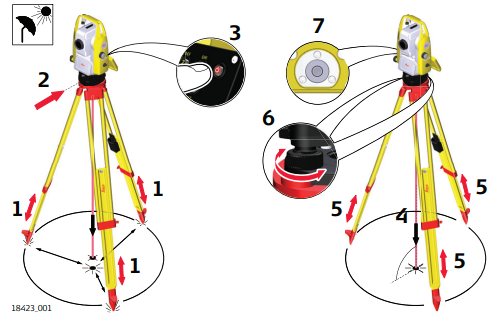
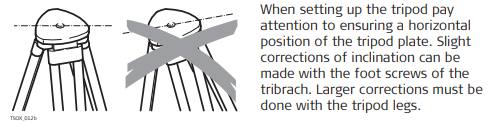
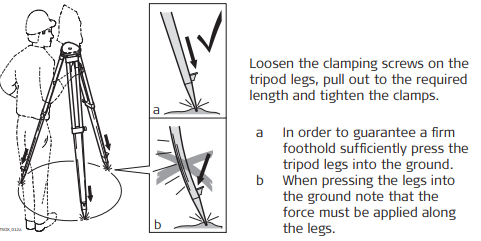
- Extend the tripod legs to allow for a comfortable working posture. Position the tripod above the marked ground point, centring it as good as possible. Ensure that the tripod plate is roughly horizontal.
- Fasten the tribrach and instrument onto the tripod.
Shield the instrument from direct sunlight and avoid uneven temperatures around the instrument. - Turn on the instrument.
To activate the laser plummet, display the Compensator screen:
• Select Devices from the Home Menu.
• Tap the arrow button to the right of the device name.
• Tap Compensator. - Use the tribrach footscrews (a) to centre the plummet above the ground point (b).
- Adjust the tripod legs to level the circular level (c).
- By using the electronic level, turn the tribrach footscrews (a) to level the instrument precisely.
- Centre the instrument precisely over the ground point (b) by shifting the tribrach on the tripod plate.
- Repeat steps 6. and 7. until the required accuracy is achieved.
Level up with the electronic level step-by-step
The electronic level can be used to precisely level up the instrument using the footscrews of the tribrach.
- Turn the instrument until it is parallel to two footscrews.
- Centre the circular level approximately by turning the footscrews of the tribrach.
- Turn on the instrument, and, if tilt correction is set to On, the laser plummet will be activated automatically, and the level screen appears.
The bubble of the electronic level and the arrows for the rotating direction of the footscrews only appear if the instrument tilt is inside a certain levelling range. - Centre the electronic level of the first axis by turning the two footscrews. Arrows show the direction of rotation required. The first axis is levelled, when the bubble is exactly between the squared brackets [] of the single axis bubble tube.
When levelled correctly, checkmarks are displayed. - Centre the electronic level for the second axis by turning the last footscrew. An arrow shows the direction of rotation required. When all three bubbles are centred, the instrument has been perfectly levelled up.
- Accept the setting.
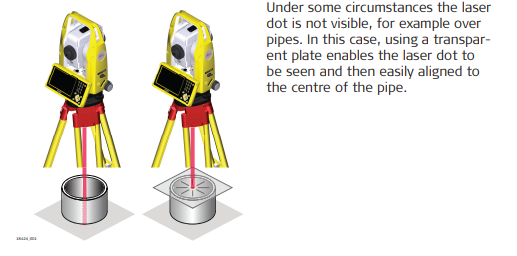
Position over pipes or holes