Access the Import / Export / Delete function
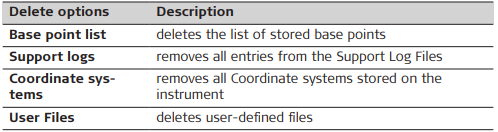
Select Settings > Tools > Import / Export / Delete, in order to:
• import or export data from/to a USB flash drive installed in the USB port of your instrument
• delete data from the internal memory
Import data from USB
Select Settings > Tools > Import / Export / Delete > Import from USB to import data from a USB flash drive installed in the USB port of your instrument.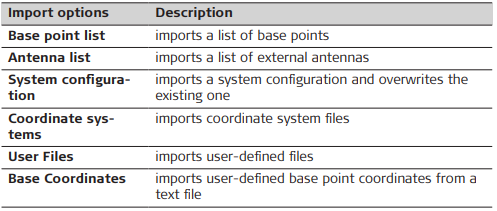
To import data from a USB flash drive to the instrument, appropriate folders must be created on the USB device and the files must be placed in the correct folders:
• Coordinate systems in a folder called [CoordinateSystems]
• User Files in a folder called [User]
• Base Point list, Antenna list and System Configuration in a folder called [System]
Export data to USB
Select Settings > Tools > Import / Export / Delete > Export to USB to export data to a USB flash drive installed in the USB port of your instrument.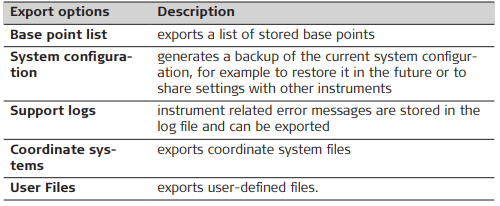
➜ To export data to a USB flash drive no folders must be created on the device manually. If not yet existing, the appropriate folders are automatically created upon export.
Delete data on the instrument
Select Settings > Tools > Import / Export / Delete > Delete on instrument to delete data from the internal memory.